What Is a Modbus Master? (RTU/TCP Explained for Beginners)
If you work with PLCs, sensors, energy meters, or any industrial equipment, you will run into the term “Modbus master” sooner or later. This guide explains what a Modbus master is, how master–slave polling works over RTU and TCP, and which free master software you can start with today.
Master vs. Slave: Who Talks First?
Modbus is a request–response protocol. In every Modbus conversation there are exactly two roles:
- Master (client): the device or software that starts every conversation by sending a request — for example, “send me holding registers 0 to 9.”
- Slave (server): the device that waits quietly, then answers the master’s request with data or a confirmation.
One master can talk to many slaves (up to 247 on a serial bus). Slaves never speak unless spoken to — that discipline is what makes Modbus predictable and easy to debug.
How Master–Slave Polling Works
“Polling” is the heartbeat of Modbus. It is simply the master repeating the same cycle over and over:
- The master sends a request frame: “Slave 3, send me holding registers 0–9.”
- The slave device processes it and replies with the requested data.
- The master checks the reply, updates its display, and moves on to the next request.
Master software like QModMaster lets you watch each request and reply as it happens — which is exactly how you find wiring mistakes, wrong slave IDs, and misconfigured registers.
Modbus RTU vs. Modbus TCP in One Sentence
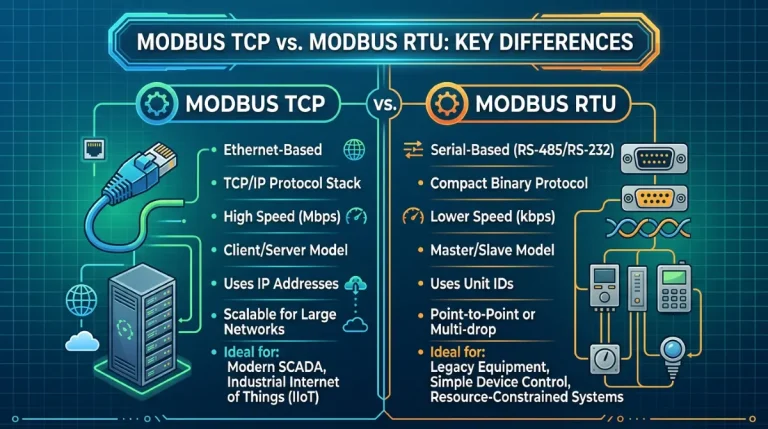
RTU: Modbus over a serial line (RS485/RS232) — one shared bus, many devices, and your PC needs a USB-to-serial adapter.
TCP: the same Modbus messages wrapped in Ethernet frames — point-to-point over your network, usually on port 502.
The function codes and the register model are identical either way; only the transport differs. If you can read holding registers over RTU, you can do it over TCP.
Function Codes at a Glance
| Code | Name | What it does |
|---|---|---|
| 01 | Read Coils | Read on/off outputs |
| 02 | Read Discrete Inputs | Read on/off inputs |
| 03 | Read Holding Registers | Read 16-bit registers you can also write |
| 04 | Read Input Registers | Read 16-bit read-only registers (e.g. sensor values) |
| 05 | Write Single Coil | Switch one output on or off |
| 06 | Write Single Register | Write one 16-bit register |
| 15 | Write Multiple Coils | Switch several outputs at once |
| 16 | Write Multiple Registers | Write several registers at once |
In practice, codes 03 and 04 cover the vast majority of reading tasks, and 06 and 16 cover most writing tasks.
When Do You Need Master Software?
- Commissioning a new device — verify it answers correctly before your PLC code depends on it.
- Debugging — see the exact bytes on the wire when something misbehaves.
- Learning — explore a device’s register map interactively, at your own pace.
- Testing — simulate a master when the real controller isn’t available yet.
Try It Yourself with QModMaster
QModMaster is a free, open source (LGPLv3) Modbus master simulator for Windows and Linux that speaks both Modbus RTU and Modbus TCP. Its built-in bus monitor shows the raw bytes of every request and reply — ideal for seeing exactly what a master does, live. New to the hands-on side? Continue with the QModMaster tutorial, the full user manual, or compare tools in our free Modbus master roundup.
Ready to run your first session? Grab the portable build from our download page — no installer, just unzip and run.
Frequently Asked Questions
Is a Modbus master the same as a Modbus client?
Yes. Master/slave is the classic Modbus terminology; client/server is the newer equivalent used in the Modbus TCP specification. They describe the same two roles: the side that sends requests and the side that answers them.
Can one Modbus master talk to multiple slaves?
Yes. On an RS485 serial bus a single master can address up to 247 slaves, each with its own slave ID. Over Modbus TCP the master typically opens one connection per device.
Do I need special hardware to use Modbus master software?
For Modbus RTU you need a USB-to-RS485 (or USB-to-RS232) adapter between your PC and the serial bus. For Modbus TCP you only need a network connection to the device — no adapter required.
What is the difference between holding registers and input registers?
Holding registers (function code 03) can be read and written — think setpoints and configuration values. Input registers (function code 04) are read-only — think live sensor measurements.