
QModMaster: The Ultimate Free Open Source Modbus Master Simulator
The most reliable Modbus RTU/TCP Master simulator for industrial automation. Test, monitor, and debug your Modbus slave devices with an easy-to-use graphical interface. Fully compatible with Windows 11, 10, and Linux.
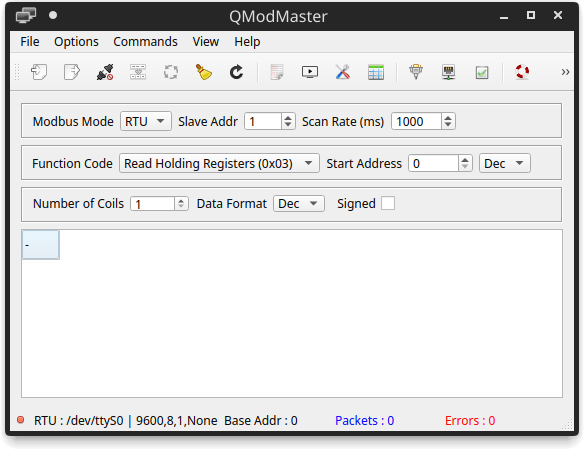
QModMaster Dashboard: Real-time Register Monitoring
Professional-Grade Modbus Testing Features
QModMaster provides a comprehensive suite of tools designed for engineers, developers, and integrators to verify Modbus communication implementation.
Full Modbus Support
Seamlessly switch between Modbus RTU (Serial RS232/RS485) and Modbus TCP/IP. It supports all standard baud rates, parity settings, and custom port configurations for Ethernet communication.
Monitor All Function Codes
Easily read and write Coils, Discrete Inputs, Holding Registers, and Input Registers. Supports multiple data formats including Integer, Floating Point (IEEE 754), and Hexadecimal.
Real-time Bus Monitor
The built-in Bus Monitor displays raw Hexadecimal traffic. Perfect for debugging CRC errors, timeout issues, and validating the exact data structure being sent across the wire.
Session Save/Load
Don’t waste time re-configuring. Save your current Modbus session parameters (IP, Port, Slave ID, Scan Rate) to a file and reload it instantly for repetitive testing.
Windows & Linux Ready
Built on the robust Qt framework, QModMaster offers a consistent experience across Windows 10/11 and various Linux distributions without dependency headaches.
Diagnostic Logs
Capture and analyze communication logs to identify intermittent failures or slave response delays. Essential for long-term stability testing in industrial environments.
Versatile Applications in Industrial IoT
Whether you are a firmware engineer or a site technician, QModMaster is the go-to tool for various industrial communication tasks.
1 PLC & HMI Communication Testing
Before deploying expensive SCADA or HMI systems, use QModMaster to simulate the master station. Verify if your PLC (Siemens, Schneider, Delta, etc.) is correctly responding to address requests and data formats.
2 Sensor & Actuator Calibration
Connect directly to Modbus sensors (Temperature, Humidity, Pressure) via a USB-to-RS485 adapter. Read real-time values and write configuration parameters to registers without writing a single line of code.
3 IIoT Gateway Development
Developing an Edge Gateway or MQTT bridge? Use QModMaster as a reference master to cross-verify the data being polled by your custom hardware, ensuring zero data loss during protocol conversion.
Pro Tip: Debugging RS485
When using QModMaster for RS485 debugging, always check your COM Port settings in the ‘Options’ menu.
Most communication failures are caused by:
- Incorrect Baud Rate (usually 9600 or 115200).
- Swapped A(+) and B(-) wires on the terminal.
- Mismatch in Slave ID (default is often 1).
- Missing 120Ω termination resistor on long cable runs.
How to Start Your First Modbus Session
Configure Connection
Go to Options -> Modbus RTU/TCP. Choose your interface. For RTU, select the correct COM Port and Baud Rate (e.g., 9600, 8, N, 1). For TCP, enter the Slave IP Address and Port 502.
Define Data View
Set the Slave ID, Function Code (e.g., Read Holding Registers 03), Start Address, and Number of Points. Use the ‘View’ menu to format data as Float, Int, or Hex.
Connect & Scan
Click the Connect icon, then click Read/Write or enable Scan for continuous polling. Watch the Bus Monitor at the bottom to see real-time data packets.
Technical Specifications
| Protocol | Modbus RTU / TCP / ASCII |
| Function Codes | 01, 02, 03, 04, 05, 06, 15, 16 |
| Data Formats | Binary, Hex, Int16, Int32, Float32 |
| OS Support | Windows 7/10/11, Linux (Ubuntu/Debian) |
| Framework | Qt 5.x / Open Source |
| License | LGPLv3 |
Verified for industrial hardware testing.
Mastering Modbus Data with QModMaster
Understanding how QModMaster handles different Modbus Registers is key to successful industrial integration. Here is how you can map your device data.
01: Coils
Read/Write Bits
Used for ON/OFF states like Relays, Solenoids, or Status LEDs. Supports Function Codes 01, 05, 15.
02: Discrete Inputs
Read-Only Bits
Digital inputs from proximity sensors or limit switches. Accessed via Function Code 02.
03: Holding Registers
Read/Write 16-bit
The most common type for Analog values, Setpoints, and Configuration. Supports Codes 03, 06, 16.
04: Input Registers
Read-Only 16-bit
Direct analog inputs like Temperature sensors or Power meters. Accessed via Function Code 04.
Handling 32-bit Float & Big/Little Endian
Many modern Modbus slaves store data as IEEE 754 Floating Point numbers across two 16-bit registers. QModMaster allows you to combine these registers effortlessly. Simply set the Data Format to Float and choose the Byte Order (ABCD, CDAB, BADC, DCBA) to match your PLC’s memory mapping. This feature eliminates the need for manual hexadecimal conversion in your head.
Platform & OS Support
QModMaster is built using the Qt Framework, ensuring native performance and high stability across different operating systems. Whether you are using a legacy industrial PC or a modern workstation, we’ve got you covered.
System Requirements
- Processor 1.0 GHz or faster
- RAM 512 MB (Min), 2 GB (Rec)
- Disk Space ~25 MB (Portable)
- Interface USB/Serial or Ethernet
- Dependencies None (Self-contained)
Understanding the Modbus Communication Model
In a Modbus network, there is always one Master and one or more Slaves. QModMaster acts as the “Brain” (Master) of the operation.
The Modbus Master
The Master (Client in TCP) is the device that initiates all requests. It asks the sensors for data or tells the actuators what to do.
- Role: Active Polling & Command.
- Software: QModMaster, Modbus Poll, SCADA.
- Action: Sends Request -> Waits for Response.
The Modbus Slave
The Slave (Server in TCP) is the device that holds the data. It waits silently until the Master sends a request to its specific Slave ID.
- Role: Data Storage & Execution.
- Devices: VFDs, PLCs, Sensors, Modbus Pal.
- Action: Listens -> Processes -> Replies.
Need a Slave to test with QModMaster?
If you don’t have physical hardware, you can use ModbusPal or diagslave to create a virtual slave on your PC. Connecting QModMaster to a virtual slave via localhost (127.0.0.1) is the best way to learn the protocol.
Advanced Troubleshooting Guide
Encountering an issue? Most Modbus communication problems can be identified by analyzing the Exception Codes in QModMaster.
Common Modbus Exception Codes
“No Response” or Timeout?
If QModMaster shows “Timeout”, the request never reached the slave or the slave ignored it.
- Is the Slave ID correct? (Zero is Broadcast).
- RS485: Check A and B polarity.
- TCP: Is the Port (502) blocked by a firewall?
- Is the Scan Rate too fast for the slave?
Pro Tip: Use the Bus Monitor in QModMaster to see if any hexadecimal data is actually being received. If you see “?? ??” it usually indicates a checksum (CRC) error or noise on the line.
QModMaster vs. Commercial Alternatives
Why do thousands of engineers prefer QModMaster over expensive commercial licenses? Check the feature-by-feature breakdown below.
| Features & Capabilities | QModMaster (Free) | Modbus Poll / ModScan |
|---|---|---|
| Licensing Cost | $0 (LGPLv3 Open Source) | $79 – $199 per user |
| Bus Monitor (Raw Data) | Built-in (Real-time Hex) | Basic (Often limited) |
| Installation Required | No (Portable Executable) | Yes (Standard Setup) |
| Multiple Data Formats | Float, Int, Hex, Binary | Advanced Formatting |
| Platform Support | Windows & Linux | Primarily Windows |
The Verdict for Engineers
While commercial tools like Modbus Poll offer OLE Automation and advanced logging for QA labs, QModMaster is the superior choice for field technicians and embedded developers who need a fast, portable, and zero-cost tool to verify communications instantly on the factory floor.
Expert Knowledge Base
Deep dive into common technical queries and configuration edge cases.
Q: Does QModMaster use 0-based or 1-based addressing?
QModMaster typically uses 0-based protocol addressing. If your device manual says “Holding Register 40001”, you should usually enter “0” in the Start Address field with Function Code 03. If you can’t read data, try offsetting the address by +/- 1.
Q: How to handle RS485 RTS Control?
In the Modbus RTU Settings, you can toggle “RTS Control”. This is crucial for hardware converters that do not have automatic direction control. You can set it to “Always Up” or “Toggle” depending on your RS485 adapter’s requirements.
Q: Can I export Modbus data to CSV/Excel?
While QModMaster doesn’t have a direct “Export to Excel” button, you can right-click and copy the Bus Monitor log. For continuous data logging, we recommend using the “Log to File” feature found in the View or Options menu.
Q: What is the limit for “Number of Points”?
Following the standard Modbus specification, QModMaster allows reading up to 125 Holding Registers (16-bit) or 2000 Coils in a single request. If you need more, you must set up multiple sessions or polling sequences.
Q: What is the ideal Response Timeout?
For Modbus TCP, 1000ms is standard. For Modbus RTU over wireless radios or long cables, you may need to increase this to 3000ms-5000ms to account for latency and signal propagation.
Q: Can multiple Masters connect to one Slave?
In RTU (RS485), no. Only one master can exist. In TCP/IP, it depends on the slave. Most modern Modbus TCP Servers allow up to 4-16 concurrent connections from different QModMaster instances.
Built by the Community, For the Community
QModMaster is a free software project licensed under the GNU Lesser General Public License v3.0 (LGPLv3). This ensures that the tool remains free for everyone and that the industrial automation community can continue to improve its core capabilities.
Technical Stack for Developers:
- Core Framework: C++ with Qt 5.x / 6.x Support.
- Protocol Engine: libmodbus (highly reliable implementation).
- UI Library: Qwt (for real-time data plotting).
- Cross-Platform: Compiled for Windows (MinGW/MSVC) and Linux (GCC).
Support the Project
While this website acts as a resource and download mirror, the real magic happens in the code. You can contribute to the QModMaster ecosystem by:
Need professional technical support?
Contact Community ExpertsReady to Master Your Modbus Network?
Stop struggling with manual hexadecimal conversions and unreliable debugging tools. Join over 500,000+ engineers worldwide who trust QModMaster for their industrial automation projects.
Looking for source code or earlier versions? Visit our Archive →